Chrome Extension
Kiri on every page you read and write
Highlight a sentence to translate it, catch spelling and grammar mistakes as you type, hear it in a natural voice, dictate into any text field, or transcribe what you record — without leaving the tab.
Free · Chrome 116 and newer · Runs on your own Kiri account
Five tools, one toolbar button
Translation, writing checks, speech, dictation and transcription — the same engines behind the Kiri web app, wherever you happen to be reading or writing.
Highlight to translate
Select text on any page and a small button appears. Click it and a card opens with the translation, the language it detected, and the original beside it — with a Latin-script reading for Khmer if you want one.
Check your writing
As you type in a text field, Kiri underlines spelling, grammar and punctuation mistakes in Khmer and English — and leaves mixed Khmer-English writing alone where it is right. Click an underline to accept the fix, or review every suggestion at once.
Read it aloud
Play the translation or the original in any voice on your account, cloned voices included. A player stays in the corner of the page, so you can stop it even after the card is gone.
Type with your voice
Click into a text field, textarea or rich-text editor and a microphone appears. Speak, and each phrase lands at your cursor as it settles — in comment boxes, forms, webmail and web editors.
Transcribe in the side panel
Record from your microphone, drop in an audio file, or stream live and watch the words appear. Transcripts come back with timings and export to SRT — and Pro mode is there for hard recordings.
A translate box in the toolbar
The popup opens with whatever you had selected already filled in. Pick the languages, translate, then read the result aloud or copy it.
Without touching the mouse
On a Mac, use Ctrl+Shift with the same letter. Rebind any of them from chrome://extensions/shortcuts.
You decide what it sees
Translation, reading aloud and dictation start with a click, a shortcut or a menu entry. Grammar checking, while it is on, sends only the sentences you have just typed, a moment after you pause — never password fields. Everything goes only to Kiri, the microphone is live only while you are recording, and you can switch any of it off, or turn the extension off for a site.
Every part of it
The same tools, one screen at a time.
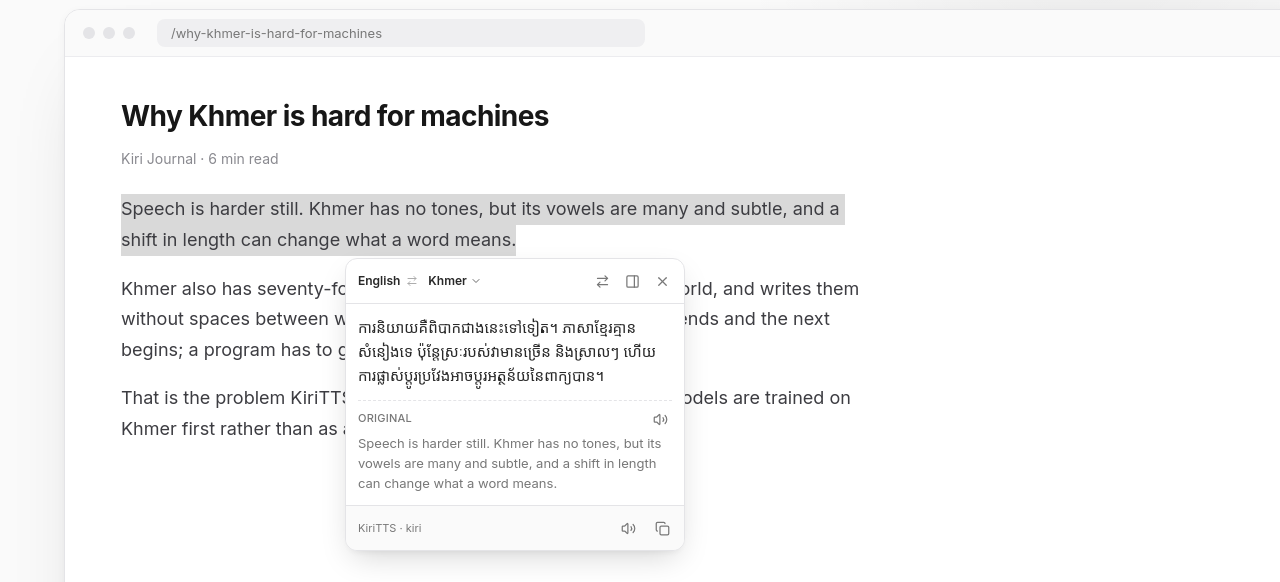
Highlight anything, get the translation right there
Select text on any page and a card opens with the translation, the language it detected, and the original beside it.
How it works
Installed and working in about a minute.
- 1
Add it to Chrome
Install from the Chrome Web Store. The extension itself is free — it runs on your own Kiri account rather than a separate subscription.
- 2
Sign in with KiriTTS
Press Sign in with KiriTTS in the extension and approve it here — no API key. Translation and grammar checks are free for the first 100 a day each; speech and transcription use your plan’s credits.
- 3
Use it on any page
Highlight text to translate or hear it, type in any text field to have your writing checked, click the microphone to dictate, or open the side panel to record and transcribe.
Languages
Twenty languages, Khmer first
Translate in either direction between any of these. If the page is already in your target language, it translates the other way.
Frequently Asked Questions
Yes — a free one is enough. Press Sign in with KiriTTS in the extension, approve it on kiritts.com, and you are connected; there is no API key to create. Every plan works, including the free plan.

Put Kiri in your browser
The extension is free, and everything it does draws on the credits your plan already includes.